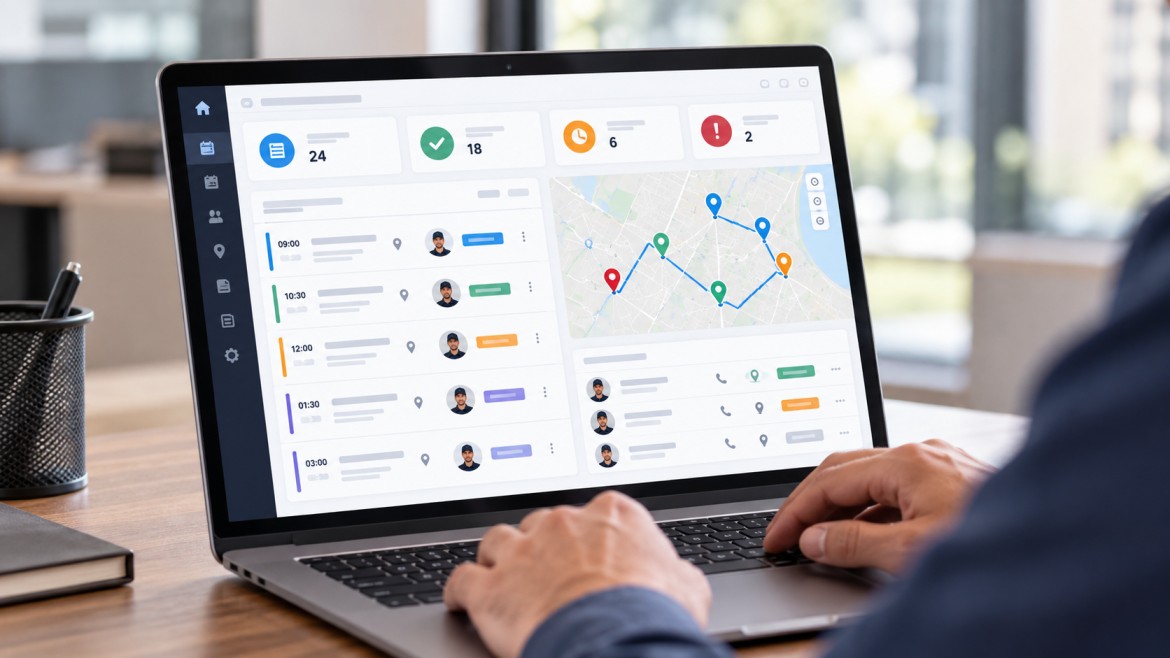
Field service management (FSM) is the process of organising and coordinating work that employees or contractors perform outside a company's main workplace. It covers activities such as receiving service requests, creating work orders, scheduling technicians, assigning jobs, tracking progress, managing customer information and recording completed work.
The scale of this type of work is substantial. The U.S. Bureau of Labor Statistics recorded 6,086,190 jobs in installation, maintenance and repair occupations in May 2025, including technicians, installers, mechanics and repair workers across several industries.
Field service management gives businesses a way to coordinate this work from the initial service request through to job completion. Software can support the process by bringing schedules, work orders, technician information, service records and field updates into one system.
Field service refers to work carried out at a customer's location or another site away from the company's main premises.
A technician visiting a customer's property to repair an air conditioner is performing field service. So is an engineer installing industrial equipment at a factory, an electrician inspecting a commercial building, or a telecommunications technician installing network equipment.
Common field service activities include:
Equipment installation
Repairs and troubleshooting
Preventive maintenance
Inspections
Technical support
Equipment servicing
Site visits
On-site installation and configuration
The work can involve employees, contractors or a mixture of both.
A useful distinction is:
Field service is the work. Field service management is how that work is organised.
For example, imagine a commercial HVAC company receives a maintenance request. The customer service team records the request, a manager checks which technician has the necessary skills, an appointment is arranged, the technician receives the job information, the visit takes place, and the service record is updated afterwards.
Every one of those steps forms part of the field service operation.
Field service management covers much more than putting technician appointments on a calendar. It involves coordinating people, jobs, information, equipment and customer requirements.
Scheduling determines when a job should take place and which technician can handle it.
A useful schedule may need to account for:
Technician availability
Required skills
Job duration
Customer availability
Location
Travel time
Existing assignments
Job priority
Emergency work
A technician who is free at 2 PM is not necessarily the best choice for a job at that time. If another technician is already nearby and has the required skills, assigning the closer person may make more sense.
Dispatch is the process of sending a technician or field worker to a particular job.
The dispatcher may need to consider the technician's location, qualifications, workload, availability and the urgency of the service request.
For a simple operation, dispatch may be handled through a phone call and a shared calendar. Larger teams often need a central system that shows open jobs and available workers at the same time.
A work order records the work that needs to be completed.
It can contain information such as:
Customer details
Service location
Problem description
Assigned technician
Required tasks
Appointment time
Equipment information
Job status
Technician notes
Completion details
A typical work order moves through several stages:
Service request → work order → assignment → scheduling → field work → completion → record update
Work order management is particularly useful when a business has many jobs running at the same time because managers can see which work is pending, active or completed.
Field service managers also need to know who is available, who is working, where assignments stand and whether jobs have been completed.
Depending on the business, this can include:
Staff schedules
Attendance
Working hours
Current assignments
Job status
Location
Completed tasks
Service activity
This is different from managing an office-based team. A manager may not physically see a field technician during most of the working day, so accurate job and attendance information becomes more important.
Technicians often need information while they are away from the office.
Mobile field service tools can give them access to:
Work orders
Customer information
Previous service history
Job instructions
Tasks
Appointment details
Status updates
Forms and checklists
They can also send information back to the office after or during a visit.
This reduces the need for technicians to call the office for basic job information or wait until the end of the day to report what happened.
A completed visit should leave behind a useful record.
For example, a maintenance visit might record what equipment was inspected, what problem was found, what work was carried out and whether another visit is required.
Over time, those records create a service history that can help staff understand what has happened at a particular customer site.
A typical field service process starts before a technician leaves the office.
A customer reports a problem or requests a service.
The request may come through a phone call, website, email, customer portal or another channel.
The business determines what needs to be done.
This can include identifying the type of service, urgency, location, equipment involved and skills required.
The service request becomes a work order containing the information needed to carry out the job.
A suitable technician is selected based on factors such as skills, availability, workload and location.
The customer and technician are given the relevant appointment information.
For recurring maintenance, the business may already have a planned schedule.
The technician travels to the site, carries out the assigned work and records relevant information.
The technician updates the status, records notes or findings and marks the work as complete when appropriate.
The business can then update the customer's service history, billing information or follow-up tasks.
This process can be managed manually, but the number of calls, spreadsheets, messages and separate records can grow quickly as the team handles more jobs.
Field service management is a business process. Field service management software is the technology used to support that process.
A typical system may include several of the following capabilities.
|
Feature |
What it does |
|
Scheduling |
Organises appointments and technician availability |
|
Dispatching |
Assigns jobs to field workers |
|
Work order management |
Tracks work from creation through completion |
|
Technician management |
Helps managers organise field staff and assignments |
|
Mobile access |
Gives technicians job information while working in the field |
|
Customer history |
Keeps previous service information available |
|
Location tracking |
Provides visibility into field activity where appropriate |
|
Task management |
Breaks jobs into specific activities |
|
Reporting |
Shows service and staff activity |
|
Forms and checklists |
Captures structured information during visits |
|
Service requests |
Records and tracks incoming work |
|
Payment tracking |
Records payment information where supported |
The exact feature set varies between systems. A small maintenance company may mainly need scheduling, work orders and mobile updates, while a larger operation may also need inventory, contracts, asset records, routing and integration with other business systems.
The value of FSM depends on how a business operates, but several practical benefits are common.
A manager can see which jobs are pending, active or completed instead of relying entirely on calls or end-of-day reports.
That matters when several technicians are working at different customer locations at the same time.
A central schedule makes it easier to see existing assignments before another job is given to a technician.
It can also make it easier to adjust schedules when an urgent job comes in or an appointment changes.
A technician who can see the customer's service history and work order details from the field has more information available before starting the job.
That can reduce unnecessary communication with the office.
A central service history gives staff a record of previous visits, repairs, inspections and other work.
This can be useful when the same customer contacts the business again or when another technician needs to handle the next visit.
Managers can track assignments, attendance, work hours and job progress from a central system where those functions are supported.
Location tracking also needs a clear business purpose and appropriate employee policies. It should not be treated as a reason to collect more employee location data than the operation actually requires.
When field updates are recorded as work happens, managers do not have to wait for every technician to submit a separate report before understanding what has been completed.
FSM is used wherever employees or contractors travel to locations to install, maintain, inspect, repair or support products, equipment or services.
Technicians may handle installation, maintenance, inspections and emergency repairs at homes or commercial properties.
Manufacturers and service companies may send technicians to customer sites for installation, maintenance, warranty work and repairs.
Field workers may install network equipment, repair connections or carry out infrastructure work at customer or network locations.
Specialist technicians may install, inspect and repair equipment used by healthcare organisations.
Maintenance teams may handle repairs, inspections and scheduled work across multiple buildings.
Field teams may inspect, maintain and repair equipment spread across large geographic areas.
The industries differ, but the operating problem is similar: work has to be assigned to people who are away from the office, and someone needs to keep track of that work.
These terms are related but they are not the same thing.
Field service management is the overall process of organising field operations.
Field service management software is a system that helps businesses manage those operations.
A company can practise field service management using spreadsheets, calendars, phone calls, paper forms and messaging apps. Dedicated software becomes more useful when the number of jobs, technicians, customers or locations makes those manual processes difficult to coordinate.
The software does not replace the underlying process. It gives the business a central way to record, organise and update it.
Field service management and field force management overlap, but they can refer to different operational needs.
Field service management usually centres on service work such as:
Repairs
Maintenance
Installation
Inspections
Work orders
Technician dispatch
Customer service history
Field force management can cover a wider group of employees who spend their working day outside the office. This might include sales representatives, delivery workers, inspectors, service employees and other mobile staff.
For a business that manages several types of mobile employees, field force management can therefore be a broader category.
There is no single feature list that works for every company. The right requirements depend on the type and volume of field work.
Check whether the system can show technician availability, assign jobs and adjust schedules when plans change.
Technicians should be able to access the information they actually need while working away from the office.
If the field workflow requires constant access to a desktop computer, the system may create extra work instead of reducing it.
Look at how easily a job can move from the original request through assignment, completion and record keeping.
Managers should be able to answer basic operational questions without manually combining information from several spreadsheets.
For example:
How many jobs are still open?
Which jobs have been completed?
Which technician has a particular assignment?
Which service requests need attention?
What work has been completed during a particular period?
A field service system may need to connect with CRM, accounting, inventory, payroll or other business software.
Integration becomes more important when employees currently have to enter the same information into several systems.
Software costs can vary according to the number of users, features, integrations, support and pricing model.
The cheapest option is not necessarily the least expensive over time if staff still have to maintain several other systems around it.
At the same time, a small business does not necessarily need an enterprise platform with functions it will never use.
Some field operations problems come from the process itself rather than a lack of software.
A schedule may look efficient on a screen while technicians spend large amounts of time travelling between jobs.
Travel time needs to be considered alongside appointment availability.
A routine inspection and an urgent equipment failure should not automatically enter the same scheduling queue.
Clear priorities help dispatchers decide which work needs attention first.
If the technician arrives without the right job details, equipment history or instructions, the visit may take longer or require another trip.
Counting completed visits does not tell the whole story.
A technician who completes many jobs but has a high number of repeat visits may have a different operational issue from someone handling fewer but more complex jobs.
If customer details are stored in one application, schedules in a spreadsheet and job updates in messaging conversations, staff may spend time copying information between systems.
The risk is not simply inconvenience. Important updates can also be missed.
A commercial property reports that an air-conditioning unit needs inspection.
The service team creates a work order with the equipment and location details. A technician with the required skills is assigned and the visit is scheduled.
The technician receives the job details, completes the inspection and records the findings. If a repair is required, the business can create a follow-up task from the service information.
A factory has equipment that requires scheduled maintenance.
The service team plans the visit, assigns a technician familiar with the equipment and provides the relevant service history. During the visit, the technician records inspection results and any work completed.
The next maintenance requirement can then be based on the service schedule and equipment records.
A customer requests a new connection.
The service team creates the job, assigns a technician and schedules the appointment. The technician receives the installation details and updates the job after completing the work.
The office can then see whether the installation is complete without waiting for a paper report to arrive.
A field service operation needs more than a list of completed jobs to understand how it is performing.
Useful measures can include:
First-time fix rate: How often a problem is resolved during the first visit.
Average response time: How long it takes the business to respond after a service request is received.
Average resolution time: How long it takes to resolve a service issue.
On-time arrival rate: How often technicians arrive within the agreed appointment window.
Technician utilisation: How much of a technician's available working time is spent on productive work.
Repeat visits: How often technicians need to return to address the same problem or complete unfinished work.
Work order backlog: The amount of outstanding service work waiting to be completed.
The right metrics depend on the type of service. A business handling emergency repairs may care heavily about response time, while a preventive maintenance operation may place more attention on schedule adherence and completed maintenance work.
A small team can manage field operations with relatively simple tools.
A typical manual setup might include:
A spreadsheet for technician schedules
A calendar for appointments
Phone calls or messaging for communication
Paper forms for service records
A separate customer database
Manual reports at the end of the day
This can work when the number of technicians and jobs is small.
Problems tend to appear as the operation grows. A schedule can become difficult to maintain, job updates may arrive late, and managers may have to check several places to find the current status of a service request.
The decision to use dedicated software should therefore be based on the actual workload and coordination problems, not on the assumption that every field service business needs the same technology.
The purpose of software is to connect the different stages of field work.
A typical workflow can look like this:
Service request → work order → technician assignment → scheduling → field visit → status update → completion → reporting
A central system can keep the information from these stages together. A manager can see the status of work, while technicians can access the job information they need from the field.
The technology can also reduce repeated data entry when information is captured once and then used across the relevant stages of the workflow.
For businesses looking for a system to manage service staff, technician visits, work orders, tasks and field activity, service team management software is one way to bring those activities together.
Field service management works best when the process reflects the way the team actually operates. A business with ten technicians visiting customers may have different requirements from a company managing hundreds of field workers across multiple regions.
The basic requirements remain familiar: know what work needs to be done, assign it to the right person, give that person the necessary information, record what happened and keep the service history available.
UpTeams provides tools for managing service tasks, technician visits, staff activity, schedules, work orders and reporting from a central platform. Its service company management solution is designed for teams that need to coordinate employees working at customer locations and other field sites.
Start your free trial today