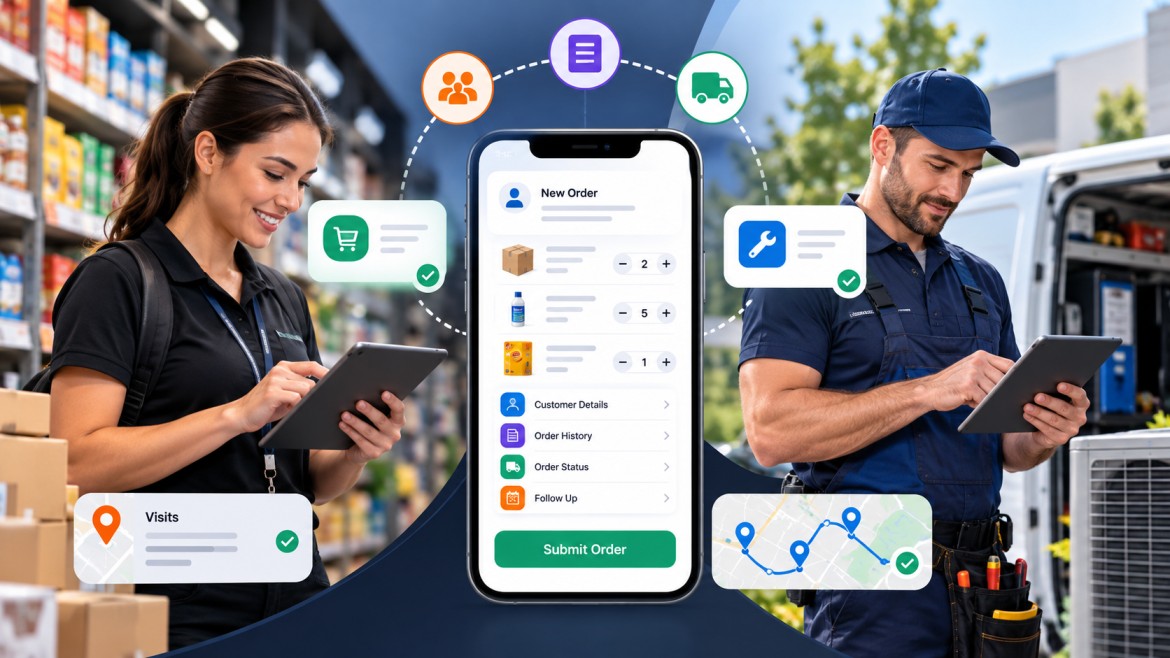
For field sales and service teams, the right order management app needs to do more than record an order. It should let people working away from the office capture orders, access customer information, update status, manage follow-ups and keep office staff informed. Five options worth considering are Repsly, SalesRabbit, ServiceNow, FieldPulse and UpTeams, although each is suited to a different type of operation.
The need for mobile access is easy to understand when you look at the nature of field sales work. The U.S. Bureau of Labor Statistics counted about 1.57 million wholesale and manufacturing sales representative jobs in 2025, and notes that some representatives have large territories and travel considerably. Many also spend their time taking orders and resolving customer problems.
That makes the workflow around an order almost as important as the order itself.
A field team should be able to manage an order without having to write information down and enter it again later.
The most useful apps connect order capture with the rest of the work happening around the customer.
A representative may be standing in a shop, visiting a distributor, meeting a customer at a job site or working alongside a technician. The app should make it possible to create or update an order from that location.
Useful capabilities include:
Creating orders from a phone or tablet
Selecting products or services
Adding quantities and notes
Accessing customer information
Reviewing previous orders
Editing order details
Submitting the order while still with the customer
For FMCG and retail teams, product selection can be particularly important. Repsly, for example, provides mobile order entry with product catalogues and barcode scanning, allowing representatives to find products and submit orders during store visits.
Creating an order is only the first step.
Once it has been submitted, someone needs to know whether it is pending, being processed, completed or requires attention. A good system should make that status visible without requiring repeated phone calls between the field and office teams.
Follow-up tasks can also matter. A customer may request a product change, ask for a callback or require a service visit after placing an order.
A representative should not have to start from scratch every time they visit a customer.
Having previous orders, customer details, notes and related activity in one place can help the representative understand what has already happened and what needs to happen next.
This becomes particularly useful for repeat orders. A retailer that regularly buys the same products, for example, may be easier to serve when the representative can see the customer's previous purchasing activity during the visit.
There is an important difference between a sales order and a work order.
A sales order generally records a customer's request to purchase products or services.
A work order is usually tied to a specific piece of work, such as an installation, inspection, repair or maintenance visit.
A business that sells equipment and also provides installation or maintenance may need both.
The five apps in this list are considered from the perspective of field sales and service teams rather than warehouse or ecommerce operations.
The main areas to look at are:
Mobile order entry
Sales order management
Work order management
Customer information
Order history
Field activity
Task management
Scheduling and dispatch where relevant
Reporting
Integrations
Pricing
The type of business each product suits
There is no single feature that makes an app suitable for every field team.
A distributor with dozens of sales representatives may care most about mobile order entry and customer history. A maintenance company may care more about work orders, technician scheduling and job status.
The best choice is the one that fits the actual workflow.
UpTeams is designed for teams that need order management alongside other field operations rather than treating orders as an isolated process.
Its Order Management feature supports both sales orders and service-based work orders. Orders can be created from mobile devices or the dashboard, while teams can track status changes, maintain customer and order history and monitor pending and completed work.
This distinction is useful for businesses where the same field operation can involve different types of work.
A sales representative may record a customer order during a visit. A service employee may need to manage a work order for an existing customer. Managers can then have visibility into what is pending, what has been completed and which actions still need attention.
The wider field workflow also matters. Order management can sit alongside customer visits, leads and tasks instead of requiring a separate system for each activity.
For businesses that want these activities connected, order and work order management can be part of the same field-team workflow.
Best suited for: Field sales and service teams that need sales orders, work orders and broader field-team management in one system.
Main limitation: Businesses looking for a specialised warehouse, ecommerce or enterprise ERP platform may need a different type of software.
Repsly is particularly well suited to field sales and retail execution teams that need to manage customer visits, product information and orders from the field.
Its field sales offering includes mobile order entry, product catalogues, store-level sales information, territory management and field performance reporting. Representatives can review product details and submit orders from the store, including through barcode scanning.
That makes it a strong option for consumer goods companies, manufacturers and brands whose sales representatives regularly visit retailers.
The strength of Repsly is its connection between the sales visit and the order. The representative can work with store-level information instead of treating order entry as a separate administrative task.
It also goes beyond basic order capture. Teams can assign tasks, manage visit schedules and review field performance, which can be useful when sales activity involves merchandising or retail execution as well as taking orders.
Best suited for: FMCG, CPG, retail sales and merchandising teams.
Main limitation: Businesses looking primarily for technician-based service management may find a dedicated field-service platform more appropriate.
SalesRabbit is built more around field sales management than traditional order processing.
Its platform includes lead management, territory management, appointment scheduling, route planning and field activity tracking. Teams can assign territories to representatives, track lead progress and manage appointments from the field.
This makes it useful for businesses where the sales process begins with prospecting and territory activity before an order is created.
For example, a representative may work through a defined territory, manage leads, schedule appointments and move prospects through the sales process. The value here is the connection between field activity and sales management.
SalesRabbit also publishes different plans based on team size and functionality, with its current entry-level Team plan listed at $59 per user per month for one to four users. Pricing and included features should always be checked before making a purchase because plans can change.
Best suited for: Outside sales teams that need territory, lead and appointment management alongside their sales workflow.
Main limitation: It is more naturally positioned as a field sales platform than as a dedicated sales-order or service work-order system.
ServiceNow is a much broader platform, but its Field Service Management capabilities make it relevant for larger organisations that need structured work-order processes.
Its field-service documentation describes work orders as the records used to define field work, with tasks assigned to field service agents. The platform also supports scheduling, dispatching and mobile management of work-order tasks.
Field technicians can use the mobile application to view and update work-order tasks while away from the office. Managers can also create and reassign work from mobile devices.
This is useful for organisations where service operations involve several layers of coordination.
For example, a service request can become a work order, the work can be broken into tasks, those tasks can be assigned to field employees and progress can then be tracked through the system.
ServiceNow is therefore better viewed as an enterprise field-service platform than a simple order management app.
Best suited for: Larger organisations with complex service operations, structured workflows and broader enterprise-system requirements.
Main limitation: Smaller businesses may find its breadth and implementation requirements unnecessary for straightforward order management.
FieldPulse is designed around field service businesses and combines work orders with scheduling, customer management and mobile field operations.
Its work-order tools allow businesses to create and assign jobs, set deadlines and notify technicians on their mobile devices. The platform also supports scheduling and dispatching, custom workflows and mobile access to customer and job information.
The distinction between FieldPulse and a field-sales platform is fairly clear.
If the core problem is sending representatives into stores to capture product orders, a sales-focused system may make more sense. If the business sends technicians to customers to perform installations, repairs or maintenance, FieldPulse's work-order approach is more relevant.
Its mobile workflow gives technicians access to job details while they are in the field, while office staff can maintain visibility over schedules and assigned work.
Best suited for: Small and mid-sized field service businesses such as contractors and home-service companies.
Main limitation: Its focus is primarily field service, so businesses whose main requirement is retail or distributor order capture may want a more sales-oriented application.
For field sales, the most useful apps are usually the ones that connect the customer visit with the sales process.
The representative should be able to access customer information, review previous activity, record an order and move on to the next customer without returning to a desktop.
Repsly is a strong fit for retail and FMCG teams because its mobile order entry is closely connected to store-level sales information, product catalogues and field execution.
SalesRabbit is better suited to sales organisations where territory management, prospecting and appointments are central to the workflow.
For teams that need order management as part of a wider field operation, UpTeams is worth considering because its order functionality sits alongside other field activities.
The right choice depends on what happens before and after the order. If most of the work involves finding prospects, territory management may matter most. If representatives spend their days visiting existing retailers and taking product orders, mobile order entry and customer history become more important.
Service teams have a different set of requirements.
A technician usually needs to know:
Where the job is
Who the customer is
What needs to be done
When the job is scheduled
What information or parts are required
What has already happened
What needs to be recorded after the visit
ServiceNow's field-service workflow, for example, is built around work orders and tasks. Its mobile tools allow field technicians to view and update assigned work while managers can oversee and reassign tasks.
FieldPulse takes a similar service-first approach, with work-order creation, scheduling, dispatch and mobile access to job information.
UpTeams can be a better fit for organisations that have both service work and sales activity and want those workflows handled within the same field-management environment.
The important point is to distinguish work-order management from simple order tracking. A service team needs software that reflects the work being performed, not just the commercial transaction.
FMCG sales teams often have a very specific workflow.
A representative visits a retailer, checks the account, discusses products, records quantities, submits an order and moves on to the next location. The office then needs a reliable record of what was ordered and what happens next.
The app should make the process quick enough that representatives do not postpone order entry until the end of the day.
Repsly is particularly relevant here because its field-sales tools include product catalogues, mobile order entry, barcode scanning and store-level sales information.
For teams looking at a wider field-sales workflow, FMCG retail sales teams can also benefit from connecting orders with customer visits and field activity.
There is another issue that is easy to overlook: repeat business.
A retailer may place similar orders every week or month. Being able to see the previous order and customer history can make the next visit faster and can also help a representative spot unusual changes in buying patterns.
The terms sound similar, but they describe different processes.
A sales order generally starts with a customer deciding to purchase something.
For example:
A retailer orders 20 cases of a product from a sales representative.
The system needs to record the customer, products, quantities and order status.
A work order starts with a request for work.
For example:
A customer requests installation of equipment. The business creates a work order, assigns the job to a technician and tracks the work through completion.
Field-service platforms commonly structure work orders around tasks. ServiceNow, for example, describes a work order as containing the work that field agents need to complete, with individual tasks providing the details required to carry out that work.
Some businesses sit between these two models.
An equipment company might sell a product and then send a technician to install it. A distributor might sell equipment while also providing maintenance. A business could therefore need a sales order first and a work order afterwards.
In these situations, using separate systems can create unnecessary handoffs. A single field workflow can make it easier to keep the customer, transaction and service history connected.
Before choosing an app, test the actual workflow rather than judging it from a feature list.
Ask a representative to create a real example order.
Can they find the customer quickly?
Can they find the right product?
Can they make changes?
Can they submit the order without assistance?
These small details matter because field employees may repeat the process dozens of times each week.
Find out what happens once the order has been entered.
Who receives it?
Can someone assign a follow-up task?
Can the order status be changed?
Can the representative see whether the order has been processed?
Can managers identify pending work?
An app that handles the first step well but leaves everything else disconnected may not solve the underlying problem.
Reporting should answer practical questions.
For example:
How many orders did each representative create?
Which orders are still pending?
Which customers have recent activity?
How much order activity is coming from each territory?
Which work orders remain incomplete?
A large number of dashboards is not necessarily useful. The reports should match the decisions managers actually make.
Consider whether the order system needs to connect with:
CRM software
Accounting software
ERP systems
Inventory systems
Delivery platforms
Customer databases
An integration can save work, but only if the business actually needs it.
Look beyond the advertised starting price.
Check whether the cost changes according to:
Number of users
Feature level
Mobile access
Reporting
Integrations
Implementation
Support
Contract length
If a vendor does not publish pricing, ask for the exact cost based on the number of users and required features rather than relying on a generic estimate.
Warehouse and ecommerce systems can be excellent at fulfilment, inventory and shipping while being poorly suited to a representative taking orders during a customer visit.
The workflow is different.
An order is not finished simply because it has been entered.
The business still needs to process it, track it, communicate changes and complete the required follow-up.
A system may look excellent on a desktop but be awkward on a phone.
Always test the actual mobile workflow before buying.
A business does not need every feature available.
If the team primarily needs customer visits, mobile order entry and order tracking, a complicated system built for a large enterprise may create more work than it removes.
If the company also installs, repairs or maintains products, sales-order functionality alone may not be enough.
Check whether work orders, tasks, scheduling and service history are supported.
Managers often evaluate software from an administrative perspective.
The people using it in shops, customer locations and job sites may have very different priorities.
Give them the opportunity to test the app before making the final decision.
There is no useful single price for an order management app because the products in this category serve very different businesses.
Some use per-user subscriptions. Others use tiered plans or custom pricing based on team size and required functionality.
For example, SalesRabbit currently lists a Team plan at $59 per user per month for one to four users, while higher tiers are priced differently.
The important thing is to compare the cost against the workflow you actually need.
A cheaper app may be enough for a small sales team that only needs mobile order entry. A service company with technicians, scheduling, work orders, customer history and invoicing may need a more extensive platform.
Before signing up, calculate the actual monthly or annual cost for your team rather than comparing only the lowest advertised plan.
There is no single order management app that is right for every field team.
Repsly makes sense for organisations focused on retail execution and mobile product ordering. SalesRabbit is more appropriate for sales teams that depend heavily on territories, leads and appointments. ServiceNow fits larger service operations with structured work-order processes. FieldPulse is aimed more directly at small and mid-sized field service businesses.
UpTeams is worth considering for teams that need sales orders and service work orders alongside field visits, customer activity and task management. Its order-management functionality supports mobile and dashboard order creation, order status tracking, customer and order history, and visibility into pending and completed work.
The best way to choose is to start with the team's daily workflow.
If a sales representative spends most of the day visiting retailers, test how quickly the app can create an order and retrieve customer history. If technicians spend their days travelling between service locations, test work-order assignment, mobile updates and job completion. If the business does both, look for software that can keep those activities connected.
That approach will usually produce a better decision than choosing an app simply because it has the longest feature list. Contact Us Now For Order Management App Demo.
Start your free trial today