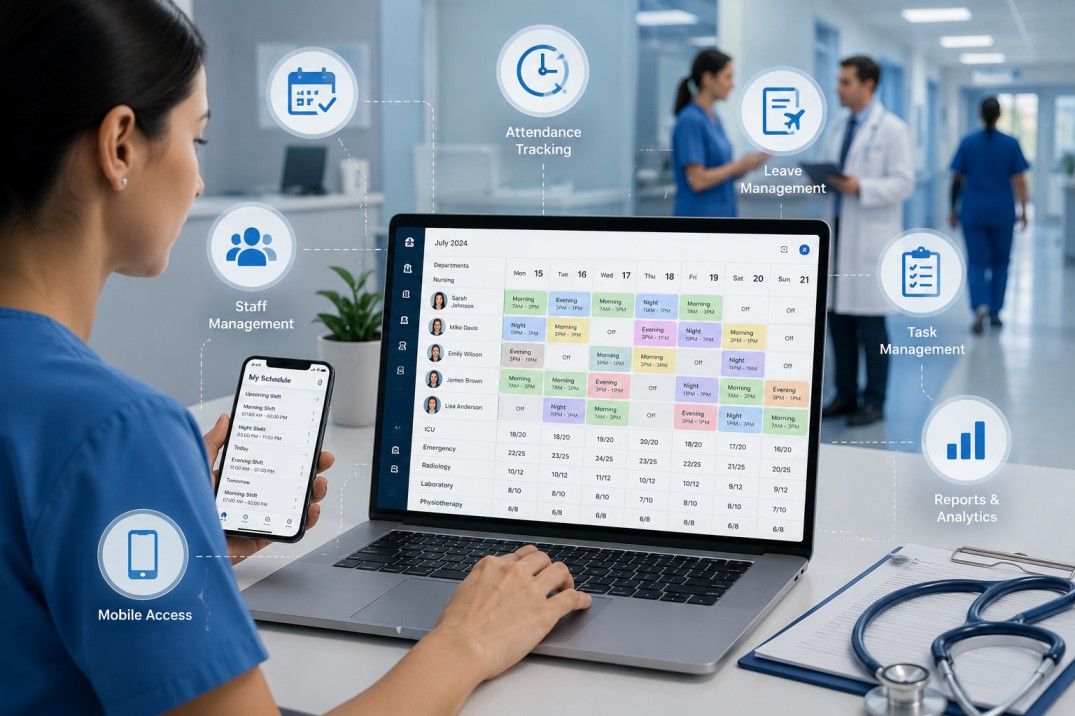
Hospital staff scheduling software is a system that automates shift planning, attendance tracking, leave approvals, and task assignment for doctors, nurses, and support staff across departments. The features that matter most are automated roster generation, real-time attendance tracking, leave and expense management, task and appointment scheduling, mobile access for floor staff, and reporting that gives administrators visibility into daily operations.
If you run a hospital or clinic, you already know why this matters. A single missed shift change can mean an understaffed ward at 2 AM. A spreadsheet that three people are editing at once can mean double-booked nurses on a Friday night. According to NSI Nursing Solutions' National Health Care Retention & RN Staffing Report, the average cost of turnover for a bedside RN runs into six figures when recruitment, onboarding, and lost productivity are factored in. Scheduling chaos is rarely the only cause of that turnover, but it is almost always part of it.
This article walks through what hospital scheduling software actually does, the features that separate a useful system from a generic HR tool, and the mistakes hospitals commonly make when picking one. By the end, you should know exactly what to look for and what to skip.
Most hospitals don't plan to end up with a scheduling mess. It happens gradually.
A small clinic starts with a whiteboard or an Excel sheet. It works fine when there are fifteen staff members across two shifts. Then the clinic adds a diagnostic wing, hires home-care nurses, and opens a second location. Suddenly that same spreadsheet is being edited by three different department heads, none of whom can see what the others changed.
WhatsApp groups become the unofficial backup system. A nurse calls in sick, and the head nurse has to manually find a replacement by texting five people and hoping someone replies in time. Multiply that across nursing, radiology, lab technicians, housekeeping, and security, and you get a hospital running on hope rather than process.
There's also a compliance angle that gets overlooked until it becomes a problem. Hospitals have to track mandatory rest periods between shifts, overtime limits, and staff certifications that expire. A nurse working back-to-back double shifts because nobody noticed the schedule conflict isn't just a morale issue. It's a patient safety risk.
I've seen this play out in mid-sized hospitals where a single ICU nurse calling in sick triggers a chain reaction: the charge nurse pulls someone from another ward, that ward becomes short-staffed, and a junior nurse ends up covering two roles she wasn't trained for that day. None of this is anyone's fault directly. It's what happens when scheduling lives in someone's head and a few scattered spreadsheets instead of a system designed to catch conflicts before they happen.
This is exactly the gap that a centralized healthcare staff management platform is built to close, by giving every department visibility into the same live schedule instead of separate, disconnected versions of the truth.
Strip away the marketing language and hospital scheduling software does three core things: it builds rosters automatically based on rules you set, it tracks who actually shows up and when, and it gives managers a single place to see and adjust everything in real time.
The "rules you set" part is what separates healthcare scheduling tools from a generic employee scheduling app you'd use for a retail store. A hospital scheduling system needs to understand things like nurse-to-patient ratios, required certifications for specific roles, minimum rest periods between shifts, and how to flag a staff member whose license is about to expire. A retail scheduling tool has no concept of any of that.
In practice, it's rarely just one department head logging in. Nursing managers use it to build weekly rosters and approve swap requests. HR teams use it to track attendance, leave balances, and overtime. Department heads in radiology, pathology, or physiotherapy use it to assign daily tasks and monitor completion. And increasingly, home healthcare and field diagnostic staff use the mobile app to check their schedule and log visits from wherever they are, rather than calling the office for updates.
That last group matters more than people realize. Hospitals running home-care programs or mobile diagnostic services have staff who are rarely at a desk. If the scheduling tool only works from an office computer, half the workforce is left out of the system entirely.
Not every feature on a vendor's website matters equally. Here's what actually moves the needle in a hospital setting.
This is the foundation. The system should generate shift rosters automatically based on staff availability, required skill mix, and department rules, then flag conflicts before they become problems. A good system lets a nurse request a swap and routes it for manager approval instead of becoming a phone-tag exercise.
The difference this makes is hard to overstate once you've experienced it. Instead of a department head spending three hours every Sunday night building next week's roster by hand, the system proposes a draft schedule that mostly just needs review and minor tweaks.
Attendance tracking in a hospital isn't as simple as clocking in at one location. Nurses move between wards. Home healthcare staff visit patients at different addresses throughout the day. A scheduling system needs geo-attendance capability, meaning staff check in and out using GPS-verified locations, so administrators know not just that someone clocked in, but where.
This solves two problems at once. It removes the buddy-punching issue common with manual registers, and it gives home-care and field diagnostic teams an honest, automatic record of visits completed without anyone needing to fill out a paper log at the end of the day.
Leave requests submitted on paper or through a group chat get lost. A proper system routes leave requests to the right approver, updates the roster automatically once approved, and keeps a running record for payroll and compliance audits.
For field and home-care staff, expense tracking matters too. Travel costs for home visits add up, and reconciling those manually at month-end is tedious for everyone involved. Having it logged against the same visit record as it happens removes a whole layer of admin work later.
A shift tells someone when to be on duty. It doesn't tell them what to actually do once they're there. Hospitals need a way to assign daily tasks, equipment checks, patient rounds, and home visit appointments, and then track whether those tasks were actually completed.
This is particularly important for diagnostic centers and home healthcare providers, where a "shift" might involve five separate patient appointments across the city. Scheduling the shift is only half the job. Scheduling and tracking each individual appointment inside that shift is the part that actually keeps patients served on time.
Paper handover notes get misplaced. Compliance checklists filled out by hand are hard to audit later. Custom digital forms let a hospital build its own checklists for things like shift handovers, equipment inspections, or patient intake, and have that data captured the moment it happens instead of transcribed later from a clipboard.
This deserves its own mention because it's where so many scheduling tools fall short. Nurses, lab technicians on rounds, and home-care staff need to see their schedule, log attendance, and update task status from a phone. If a system was clearly designed for someone sitting at a desktop, it won't get adopted by the people who actually need it most on the floor.
A scheduling system collects a huge amount of data just by being used daily: attendance patterns, overtime trends, task completion rates, visit volumes. The value comes from turning that into reports administrators can actually act on, like noticing that one ward consistently runs short-staffed on weekends, or that overtime costs are concentrated in a single department.
When a shift needs to be covered urgently or a department needs an emergency notice pushed out, the system should be able to alert the right staff instantly rather than relying on someone manually calling down a list.
Investing in hospital staff scheduling software goes beyond simplifying shift planning. The right solution helps healthcare organizations improve operational efficiency, reduce administrative workload, enhance staff satisfaction, and ultimately deliver better patient care. Here are the key benefits hospitals and clinics can expect:
Manual scheduling often leads to overlapping shifts, understaffed departments, or accidental overtime. Automated scheduling minimizes human errors by assigning shifts based on staff availability, qualifications, and predefined scheduling rules, helping ensure every department is adequately staffed.
With routine scheduling tasks automated, managers spend less time creating rosters and resolving conflicts. Staff can quickly view their schedules, request shift swaps, and receive real-time updates, allowing everyone to focus more on patient care than administrative tasks.
Having the right healthcare professionals available at the right time directly impacts patient outcomes. Efficient scheduling ensures critical departments maintain appropriate staffing levels, reducing delays in treatment and improving the overall patient experience.
Balanced shift distribution, mandatory rest period enforcement, and fair overtime allocation help reduce employee fatigue. When staff receive predictable schedules and manageable workloads, job satisfaction improves while burnout and absenteeism decrease.
Integrated leave requests, attendance tracking, and shift adjustments eliminate manual paperwork and reduce approval delays. Managers gain real-time visibility into workforce availability, making it easier to maintain uninterrupted hospital operations.
Healthcare organizations must comply with labor regulations, staffing policies, and certification requirements. Hospital scheduling software helps enforce work-hour limits, monitor license renewals, maintain audit trails, and reduce compliance risks.
Real-time notifications keep doctors, nurses, technicians, and support staff informed about schedule changes, emergency shift coverage, and important announcements. This improves coordination and reduces communication gaps across departments.
Better workforce planning helps minimize unnecessary overtime, avoid overstaffing, and optimize labor utilization. Over time, these efficiencies can significantly reduce administrative costs while improving overall resource management.
Built-in dashboards and reports provide valuable insights into attendance trends, overtime patterns, staffing shortages, and workforce utilization. Hospital administrators can use this data to make informed staffing decisions and improve operational planning.
Whether managing a single clinic, a multi-specialty hospital, or multiple healthcare facilities, hospital staff scheduling software scales with your organization. Centralized workforce management makes it easier to coordinate teams across departments and locations without increasing administrative complexity.
Scheduling isn't just an operational issue. It's a wellbeing issue.
Healthcare staff burnout has been studied extensively, and unpredictable scheduling is consistently named as a contributing factor. The American Nurses Association has highlighted scheduling unpredictability and inadequate staffing as recurring drivers of nurse burnout and turnover intent. When a nurse doesn't know her schedule more than a few days in advance, planning her own life around work becomes nearly impossible, and that uncertainty compounds over months into genuine fatigue.
A system that enforces minimum rest periods between shifts, distributes overtime more fairly, and gives staff advance visibility into their schedule doesn't fix burnout on its own. But it removes one of the more controllable sources of stress in an already demanding job.
There's a practical side to this too. Hospitals that reduce avoidable turnover save significant money on recruitment and training, and they retain institutional knowledge that's genuinely hard to replace. A nurse who's worked in the same ICU for five years knows things a new hire won't pick up for months. Scheduling software that keeps experienced staff from burning out and leaving is, in a very direct sense, a retention tool.
A few patterns show up again and again when hospitals pick the wrong system.
The most common one is choosing a generic employee scheduling tool built for retail or office environments. These tools handle basic shift assignment fine, but they have no concept of nurse-to-patient ratios, certification tracking, or healthcare-specific compliance rules. Hospitals end up bolting on spreadsheets anyway to cover the gaps, which defeats the purpose of buying software in the first place.
Another mistake is ignoring mobile usability. If the people actually working the floor can't use the app comfortably on a phone, adoption fails within weeks regardless of how good the desktop dashboard looks.
Hospitals also tend to underestimate how much they need multi-department or multi-location support. A system that works fine for a single ward often breaks down once you try to coordinate across an entire hospital, let alone a chain with multiple locations or a diagnostic network spread across a city.
Skipping a pilot period is another recurring issue. Rolling out new software hospital-wide on day one, without testing it with a single department first, almost guarantees friction that could have been caught early.
And finally, some hospitals pick software based purely on feature lists without checking whether it actually integrates attendance data with payroll. Disconnected systems mean someone still has to manually reconcile hours at month-end, which brings back exactly the admin burden the software was supposed to remove.
Once you know the features that matter, the actual selection process comes down to a handful of practical checks.
Test how easy the system is for non-technical staff to use, not just administrators. A nursing aide or a home-care worker should be able to log attendance and check tomorrow's shift without needing training beyond a quick walkthrough.
Confirm it's mobile-first, not mobile-adapted. There's a real difference between an app designed for phones from the ground up and a desktop tool with a shrunk-down mobile view bolted on.
Check that it supports the compliance rules specific to your facility, such as rest period enforcement and certification expiry alerts, rather than assuming generic scheduling logic will cover it.
Make sure it scales across departments and locations if you're likely to expand, since switching systems again in two years is far more disruptive than picking the right one now.
Run a pilot with a single ward or department before committing hospital-wide. This single step catches more issues than any amount of pre-purchase research.
If you want to see what healthcare-specific scheduling and staff management looks like in practice, the pricing page outlines plan options worth comparing against your hospital's size and department count.
Implementation usually goes smoother than hospital administrators expect, mainly because the heaviest lifting happens before staff ever log in.
It starts with onboarding department heads and importing existing staff data, including roles, certifications, and current shift patterns. From there, scheduling rules get configured: required rest periods, skill-mix requirements per shift, approval chains for leave and swaps.
The smart move is running a pilot in a single ward or department for two to four weeks before expanding further. This surfaces the small friction points, like a shift pattern the software didn't anticipate, while the stakes are still low.
Change management matters more than the technology itself at this stage. Nursing staff who've used paper registers for fifteen years won't switch overnight just because management says so. A short, hands-on training session, plus a visible willingness from the head nurse to use the app herself, does more to drive adoption than any feature in the software.
Once the pilot ward is running smoothly, scaling to the rest of the hospital is mostly a matter of repeating the same configuration across departments, adjusting for each one's specific rules.
Hospital staff scheduling software is a workforce management solution that helps healthcare organizations plan employee shifts, track attendance, manage leave requests, and coordinate daily tasks from one platform. It replaces manual scheduling methods with automated workflows, making it easier to maintain adequate staffing while reducing administrative effort.
Hospitals operate around the clock and require the right mix of doctors, nurses, technicians, and support staff on every shift. Scheduling software helps prevent staffing shortages, reduces scheduling conflicts, improves communication between departments, and ensures daily operations run more efficiently without relying on spreadsheets or paper schedules.
Automated scheduling uses predefined rules such as staff availability, department requirements, qualifications, and shift preferences to generate work schedules. Managers can review, adjust, and approve the proposed roster instead of creating schedules manually, saving time while reducing the risk of human error.
Yes. By providing better visibility into employee schedules, attendance, and workload distribution, the software helps managers allocate shifts more effectively. This reduces unnecessary overtime, prevents overstaffing, and supports more efficient workforce planning without compromising patient care.
Absolutely. While large hospitals benefit from advanced workforce management, small clinics and medical centers can also streamline scheduling, attendance tracking, and leave management. Many solutions are scalable, allowing organizations to add more users and departments as they grow.
Most modern hospital staff scheduling solutions allow employees to submit shift swap requests directly through the platform or mobile app. Managers can review requests, approve eligible swaps, and automatically update schedules, reducing manual coordination and communication delays.
Yes. Mobile access allows doctors, nurses, caregivers, and field healthcare staff to check schedules, record attendance, receive notifications, and manage assigned tasks from anywhere. This is especially valuable for organizations with home healthcare or multi-location operations.
Many hospital scheduling platforms integrate with payroll, HR, and attendance systems to simplify workforce management. These integrations help ensure accurate salary calculations, overtime records, leave balances, and employee attendance data without requiring duplicate data entry.
Hospitals should look for features such as automated roster generation, attendance tracking, leave management, mobile accessibility, task assignment, reporting, compliance support, and integration with existing HR or payroll systems. Choosing software built specifically for healthcare environments will generally deliver better long-term value than a generic scheduling tool.
Implementation timelines vary depending on the size of the healthcare organization and the complexity of its scheduling requirements. Most providers begin with a pilot deployment in one department before expanding across the organization, making the transition smoother while minimizing disruption to daily operations.
Hospital staff scheduling software earns its place when it removes the daily guesswork around shifts, attendance, leave, and task tracking, and replaces it with a system every department can see and trust. The features that actually matter are automated roster generation, geo-verified attendance, integrated leave and expense tracking, task and appointment management beyond just shifts, mobile access for floor and field staff, and reporting that informs real staffing decisions.
Get those right, and the operational benefits follow naturally: fewer scheduling conflicts, better staff retention, and administrators who spend their time on patient care decisions instead of chasing down who's covering the next shift.
UpTeams offers healthcare staff management software built around exactly these needs, helping hospitals, clinics, and home healthcare providers coordinate scheduling, attendance, tasks, and field visits from one platform. If you're evaluating options, booking a quick demo is usually the fastest way to see whether a system fits how your hospital actually runs day to day.
From automated shift scheduling and attendance tracking to leave management, task assignment, and real-time workforce insights, UpTeams helps hospitals streamline daily operations from one centralized platform. See how the right solution can improve efficiency, reduce administrative workload, and support better patient care.
Start your free trial today