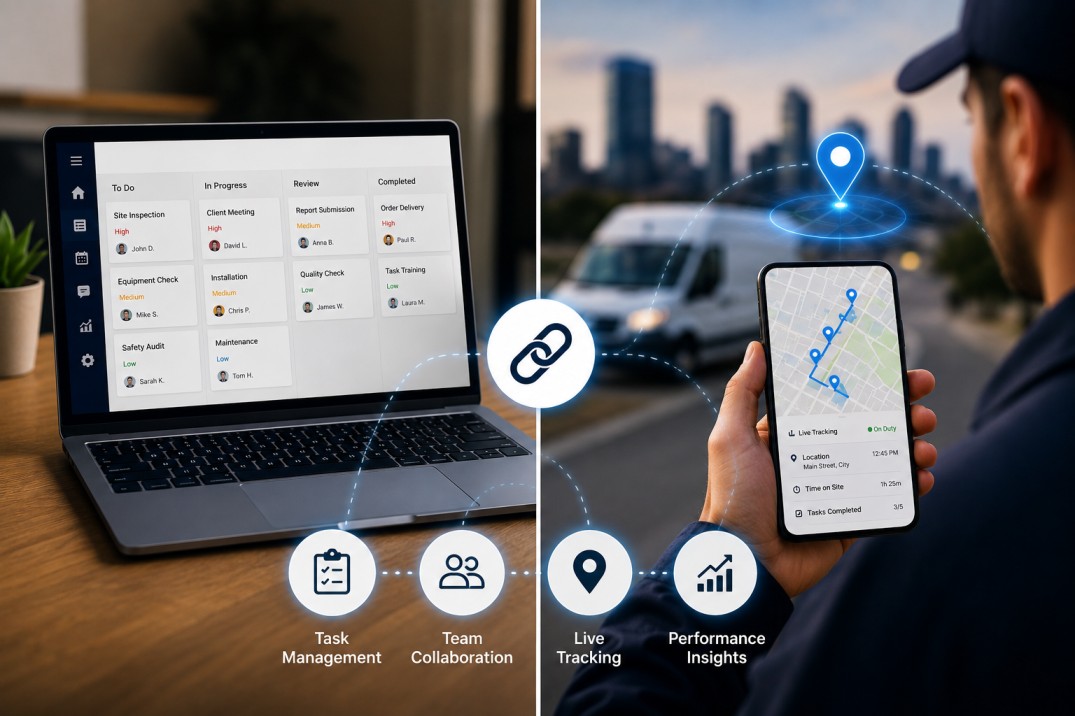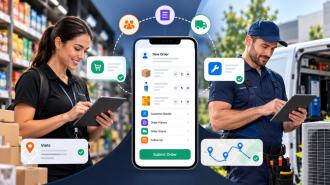
If you're only using one of these systems, you're only getting half the story. Task management tells you what work is supposed to happen. Employee tracking tells you where and how it actually happened. A business running just one of the two ends up with either a list of "completed" tasks with no way to verify them, or a map full of location dots with no idea what any of it means for the work getting done.
Here's a simple example. A field service company assigns twenty jobs a day through a task board. Every technician has a route, a client name, and a job description. On paper, everything looks organized. But by 4 PM, three jobs are still marked "in progress" and nobody knows if the technician is stuck in traffic, waiting on a part, or just running behind. The task list can't answer that. Only location and time data can.
This article breaks down what each system is actually good at, where each one falls short on its own, what happens when a business relies on just one, and why pairing them changes the way managers make decisions day to day.
At its core, a task management system takes work that would otherwise live in someone's head, a WhatsApp group, or a string of emails, and turns it into something trackable. Every task gets an owner, a deadline, and usually a priority level. Anyone on the team can see what's assigned, what's overdue, and what's next in line.
For small teams this might sound like overkill. It isn't. Even a five-person team loses hours every week to "wait, who was supposed to handle that?" conversations. A proper task management app removes that ambiguity because the assignment is written down and visible to everyone, not just remembered by whoever gave the instruction.
The upside here is real. Teams that move from verbal task handoffs to a structured system typically see fewer missed deadlines within the first month, simply because nothing falls through cracks that used to exist between conversations.
Here's the limitation nobody talks about enough: a task marked "complete" is a self-reported status. It tells you the person clicked a button. It doesn't tell you they were physically at the client's location, that the visit lasted the appropriate amount of time, or that the work was actually done to standard.
This is the mistake a lot of growing businesses make. They assume that once a task shows green in the system, the job is done and verified. It isn't. It's just marked done. There's a difference, and that difference becomes expensive once a business scales past the size where a manager can personally check on everyone.
Employee tracking, particularly GPS-based tracking and geo-attendance, answers a completely different question: where was this person, and for how long? It logs check-ins, movement between locations, time spent at each stop, and often working hours against actual clock-in data.
Take a distribution business with a small delivery fleet. Without tracking, a driver's day is a mystery beyond the delivery log. With tracking, a manager can see that a driver spent forty minutes parked somewhere that doesn't correspond to any delivery address. That's not proof of wrongdoing on its own, but it's a signal worth a conversation, and it's a signal that simply doesn't exist without location data.
The flip side is just as important. Location data on its own is thin. It tells you someone was at a specific address for two hours. It does not tell you why they were supposed to be there, what they were meant to accomplish, or whether the visit actually resolved anything for the customer.
This is where tracking-only systems get a bad reputation. Employees reasonably push back when they're monitored constantly with no context attached to the data. Two hours at a location means nothing if there's no task record explaining what that time was supposed to produce. Tracking without task context starts to feel like surveillance for its own sake, and teams notice the difference between being managed and being watched.
When a business runs task management alone, managers end up trusting self-reported completion status with no independent way to confirm it. This creates a quiet but persistent gap between what the system says and what actually happened in the field.
A common pattern: a sales rep logs eight client visits as complete in a single day. Without any tracking layer, there's no way to know that three of those "visits" lasted under two minutes, likely a phone call logged as an in-person stop, or a box checked without the visit happening at all. The task board looks clean. The reality underneath it doesn't match.
Run tracking alone and you get the opposite problem. Managers can see exactly where employees were and for how long, but there's no documented record of what those employees were supposed to accomplish while there. This turns into disputes fast. An employee says "I was there, I did the work," and management has no task record to confirm or deny it, just a location pin with no context.
Employees in tracking-only environments also tend to feel the system is invasive rather than useful, because there's no productivity story attached to the location data. It's monitoring without a purpose the employee can see or benefit from. Research on distributed and field workforces has repeatedly pointed to this exact visibility gap: businesses can see activity data but struggle to connect it to actual output, which undermines both trust and decision-making at the management level.
Pair a task ("visit Client X, resolve the invoice discrepancy") with location and time data, and suddenly the manager has the full picture: was the rep actually there, for how long, and did the underlying issue get resolved. That combination removes the guesswork on both sides. Disputes shrink because there's a time-stamped, location-verified record attached to a specific, defined piece of work, not just a vague activity log.
This is really the whole point of combining the two systems. Neither one alone gives you proof of work. Together, they do.
There's a practical, day-to-day benefit that goes beyond after-the-fact verification. When task assignment and location tracking sit in the same system, managers can reassign work based on where people actually are right now, not just who's technically "free" according to a schedule.
Picture an urgent service request coming in mid-afternoon. Instead of calling around to figure out who's available, a manager using combined task and location data can see which technician is geographically closest and currently unassigned, then route the job to them directly. That's a meaningfully faster response than working through a phone tree, and customers notice the difference in response time.
Combined systems also shift the tone of the whole relationship. When tracking exists purely on its own, it reads as surveillance. When it's tied to specific tasks and outcomes, it reads as performance measurement, which is a very different experience for the employee on the receiving end.
Field service and HR software providers have picked up on this shift in what customers actually want. Businesses increasingly ask for "proof of work" rather than just "proof of location," which is exactly why task assignment and location verification are converging into single platforms instead of staying as separate tools.
Field sales and service teams covering multiple client visits across a city or region, where both the outcome of the visit and its location/timing need to be documented together.
Delivery and logistics operations, where delays are only explainable when route data and task status are viewed side by side.
Remote and hybrid office teams, where even light activity tracking (login times, task duration) paired with a task board helps managers understand workload distribution without resorting to invasive monitoring.
Healthcare and home-service businesses, where compliance requirements often demand that a visit be both verified (location, time) and documented (notes, forms, outcome).
A field force management software setup built around this idea tends to reduce the back-and-forth managers usually deal with when trying to piece together what happened on the ground from two disconnected sources.
Buying a task management tool and assuming it automatically solves visibility problems. It solves an assignment problem, not a verification problem.
Rolling out location tracking without explaining why it exists, which damages trust and increases pushback or turnover.
Running two disconnected systems, a task app on one side and a spreadsheet or separate app for attendance on the other, forcing managers to manually cross-reference data that should already be linked.
Over-tracking employees with location data that has no task framework attached, which employees correctly read as surveillance rather than management.
Failing to frame tracking as something that protects employees too. A documented, location-verified visit record works both ways. It defends an employee against a false complaint just as much as it holds them accountable for missed work.
Real-time task assignment with live status updates, not end-of-day summaries
Location verification tied directly to specific tasks or visits, not just a generic "employee was online" log
Reporting that connects completion rates with time and location data in one view
Mobile-first design, since most field and delivery teams are working from a phone, not a desktop
Configurable tracking windows (working hours only) to avoid overreach and preserve employee trust
A platform like a task management app that includes built-in location and attendance data removes the need to stitch together two separate tools just to get a complete picture of a single day's work.
Managers are calling or messaging employees just to check on status, several times a day
There's an ongoing pattern of disputes over whether work was actually completed
Tasks live in one tool and attendance or location data lives in another, with no connection between the two
Field or remote employees report "wasted time" during the day that nobody can explain or verify
If more than one of these sounds familiar, the business has likely already outgrown a task-only or tracking-only setup, even if that hasn't been named as the problem yet.
Businesses that lean on geo attendance as their only tool often hit this exact wall. The location data is accurate, but there's no task record attached to explain what that presence was actually for.
Sales and field service organizations feel this gap earlier than most, mostly because their work happens away from a fixed office where a manager can casually check in. A rep's day is built entirely around movement between locations and a list of things to accomplish at each stop, so the two data types (task and location) need to exist in the same place to be useful at all.
This is well documented in how field employee tracking software has evolved over the last few years. What started as simple GPS logging has moved toward systems that tie location data directly to specific client visits, tasks, and outcomes, precisely because location alone wasn't giving managers enough to act on.
The same logic applies once a business starts designing actual field processes rather than just assigning one-off tasks. Teams that build out smart workflows around job assignment, tracking, and completion tend to see fewer delays and clearer accountability, because every step of a job, from assignment to location verification to closeout, lives in one connected process instead of three disconnected habits.
Ask any operations manager running a field or distributed team what eats up the most time in their day, and a surprising number will say the same thing: chasing status. Not managing performance, not planning, just chasing. Calling a rep to ask if they made it to a site. Messaging a technician to check if a job is done. Scrolling through a group chat trying to piece together who's where.
That chasing disappears almost entirely once task and location data sit in one place. A manager opens one screen and sees three things at once: what was assigned, whether it's marked complete, and whether the location and timing data back that up. No phone calls needed to confirm any of it.
There's a second, quieter benefit that shows up over a few months rather than immediately: the quality of performance conversations improves. Instead of a manager saying "I feel like you're not getting through your visits fast enough," which is vague and easy to argue with, they can point to specific data. Three visits logged under two minutes each, on a day when the task list said each should have taken twenty. That's a concrete, defensible conversation, not a gut feeling.
It also protects good employees. A worker who's genuinely doing the job well benefits just as much from combined data as a manager does, because it removes ambiguity in the other direction too. If a customer complains that "nobody showed up," a combined task and location record settles that immediately, in the employee's favor if the visit actually happened. Without that record, it becomes one person's word against another's, and that's a bad position for everyone involved, including the business.
It's worth addressing directly, because it's the objection that comes up every time tracking is introduced: employees don't love being monitored, and that reaction is fair. The difference between a system that builds trust and one that erodes it usually comes down to framing and transparency, not the technology itself.
Businesses that introduce tracking as an isolated surveillance layer, with no explanation and no connection to actual work, tend to see resistance and even turnover. Businesses that introduce it as part of a task verification system, explained clearly as protection for both sides, tend to see far less pushback. The distinction employees actually care about isn't "am I being tracked," it's "is this tracking connected to something that makes sense, or is it tracking for its own sake."
Practical steps that help: limiting tracking to working hours only, being upfront about what data is collected and why, and making sure employees can see their own task and location history, not just have it visible to management. A one-way mirror breeds resentment. A shared, transparent record tends to be accepted far more easily, because it protects the employee as much as it informs the manager.
Task management and employee tracking solve two different problems, and that's exactly why neither one replaces the other. One tells you what's supposed to happen. The other tells you what actually did. Businesses running field teams, delivery staff, remote employees, or any workforce that isn't sitting in the same room every day eventually run into the limits of using only one.
The fix isn't complicated. It's making sure the task someone was assigned and the location/time record of them doing it live in the same system, so a manager isn't left guessing or cross-referencing two separate tools just to answer a basic question: did this get done, and how do we know?
If your team is still managing these as two separate habits, a quick audit is worth doing this week. Pull up your current task list and your current attendance or location log side by side. If you can't easily match a completed task to a verified location and time, that's the gap costing you the most right now.
UpTeams brings task assignment and location-based tracking into a single system, so managers get the full picture of a workday without switching between tools or chasing down status updates manually.
Task management focuses on planning, assigning, and monitoring work to ensure tasks are completed on time. Employee tracking, on the other hand, records work-related activities such as location, attendance, working hours, or job progress. Together, they provide businesses with both task visibility and proof of work, improving accountability and operational efficiency.
Using both systems together helps businesses connect assigned tasks with real-time work activity. Managers can verify completed work, monitor progress, reduce communication gaps, and make faster decisions based on accurate task and location data.
Industries with mobile, remote, or field-based employees benefit the most, including:
Field service companies
Sales teams
Delivery and logistics
Construction
Healthcare and home care
Facility management
Maintenance services
Security services
These businesses rely on both task completion and workforce visibility to operate efficiently.
Yes. When implemented transparently, employee tracking helps managers understand work progress, identify delays, and optimize schedules rather than constantly checking on employees. When combined with task management, it focuses on outcomes instead of unnecessary monitoring.
In many countries, GPS employee tracking is legal when used for legitimate business purposes and in compliance with local privacy and labor laws. Businesses should clearly communicate their tracking policies, obtain any required consent, and limit tracking to working hours whenever possible.
Employee tracking provides time-stamped and location-based records that support completed tasks. This creates a clear record of when and where work was performed, helping resolve disputes with customers, managers, or employees more quickly and fairly.
Look for software that offers:
Task assignment and prioritization
Real-time status updates
GPS location tracking
Geo-attendance
Mobile accessibility
Employee attendance management
Reports and analytics
Workflow automation
Team collaboration
Integration between tasks and tracking data
A single platform with these features reduces manual work and improves overall efficiency.
Modern task management platforms often include employee tracking capabilities such as GPS location, geo-attendance, work status updates, and mobile access. These features help businesses manage remote and field teams while maintaining visibility into daily operations.
Managers can assign work faster, monitor job progress in real time, respond quickly to urgent requests, and verify completed visits. This leads to faster response times, better communication, and a more reliable customer experience.
A business should consider investing when it experiences challenges such as:
Missed deadlines
Limited visibility into field operations
Frequent status update calls
Attendance and productivity disputes
Growing remote or mobile teams
Multiple disconnected tools for managing work
An integrated solution helps businesses improve coordination, accountability, and operational efficiency as they grow.
Managing tasks and tracking employee activity shouldn't require multiple apps or endless follow-ups. With UpTeams, you can assign work, monitor progress, verify field activities, and manage attendance from one centralized platform.
Whether you manage field teams, sales representatives, delivery staff, or remote employees, UpTeams helps you stay organized, improve accountability, and keep work moving efficiently.
Ready to simplify the way your team works?
Start your free trial today