FMCG order management is the process of capturing, organizing, tracking, and following up on retailer orders from the moment a sales representative collects an order to the point where it is processed and completed. For FMCG businesses with large numbers of retailers and field sales representatives, a structured order management process helps reduce manual entry, avoid missed updates, maintain accurate order records, and give managers a clearer view of sales activity.
This matters because field sales representatives often spend a significant part of their working day on administrative tasks. Salesforce research found that sales representatives spend only 28% of their week actually selling. Reducing the amount of time spent recording, checking, and communicating order information can give sales teams more time for retailer visits and customer conversations.
For an FMCG business, efficient order management starts with a simple principle: the order should be recorded accurately as close as possible to the retailer interaction, and everyone who needs that information should be able to access the same record.
FMCG order management covers the activities involved in receiving, recording, monitoring, and completing orders from retailers, distributors, dealers, or other customers.
It is more than simply writing down how many units a retailer wants.
A typical FMCG order can involve a sales representative, retailer, distributor, warehouse, delivery team, and sales manager. If each person works from a different source of information, even a small change to an order can create confusion.
A structured FMCG order management process keeps the information connected.
A typical order process looks like this:
A sales representative visits the retailer.
The representative discusses current stock and requirements.
The retailer selects products and quantities.
The order is captured.
The order is submitted for processing.
The relevant team reviews the order.
The order is tracked through its next stages.
Pending actions are followed up.
The order is completed and retained in the customer's history.
The exact process differs between manufacturers, wholesalers, and distributors, but the need for accurate and accessible order information remains the same.
FMCG businesses deal with a high number of retail transactions, often across large territories. A sales representative may visit many outlets in a single day, with each retailer having different products, quantities, buying patterns, and follow-up requirements.
When orders are recorded manually, small errors can become recurring problems.
A representative might write an order in a notebook and enter it into a spreadsheet at the end of the day. Another retailer may send a change through WhatsApp. The distributor might have a different version of the order. The sales manager then has to compare information from several places before understanding what was actually ordered.
That process takes time and creates room for mistakes.
Common methods such as paper order books, phone calls, WhatsApp messages, and spreadsheets can work for a small operation. The difficulty starts when order volume and team size increase.
Typical problems include:
Incorrect product quantities
Duplicate order entries
Missing retailer orders
Delayed updates
Difficulty checking previous orders
Time spent preparing daily reports
Confusion between sales and distribution teams
Poor visibility into pending orders
The cost is not always obvious. An individual order error may appear minor, but repeated across hundreds of outlets, it can create a considerable amount of administrative work.
Order information also affects decisions beyond the individual transaction.
Sales managers need to understand which retailers are ordering, where activity is increasing or declining, which representatives are generating orders, and which orders still need attention.
If the information arrives at the end of the day or several days later, managers are working with an incomplete picture.
That can affect retailer follow-ups, sales planning, territory management, and coordination with distribution teams.
The most effective approach is to build the order process around the actual work of the field sales team.
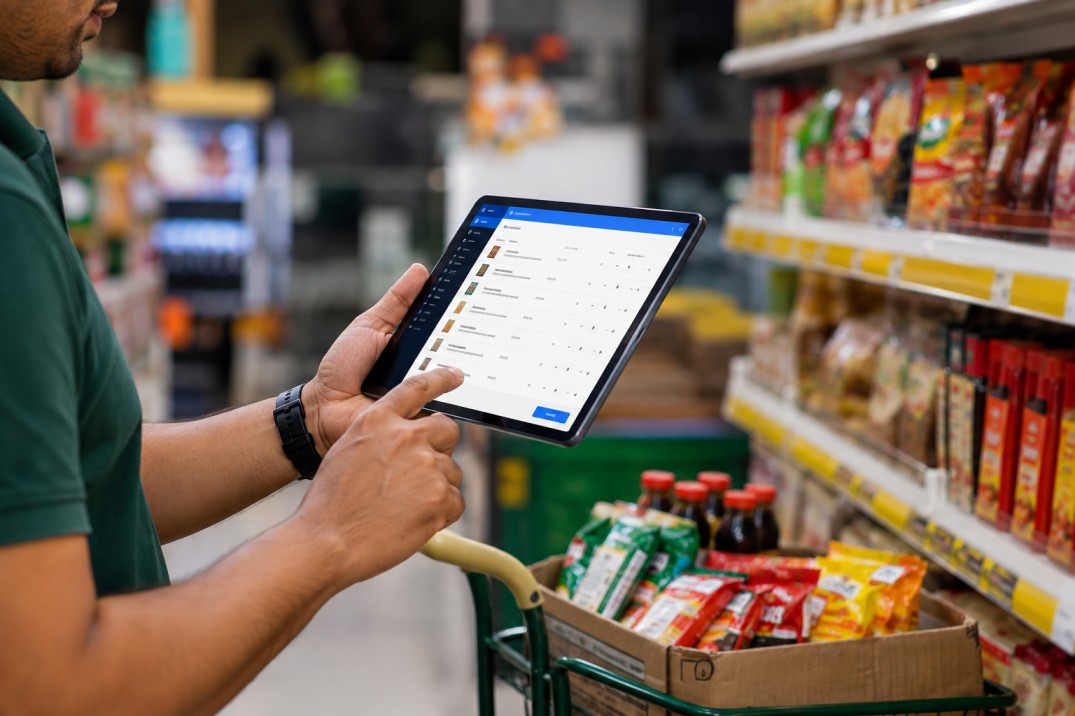
The first step is recording the order while the representative is still with the retailer.
Product, quantity, customer information, and relevant notes should be entered carefully before the visit is finished.
This removes one of the biggest weaknesses of manual order collection: trying to remember and re-enter information later.
For example, if a representative visits 20 retailers and waits until the evening to enter all 20 orders, there is a greater chance of forgetting a quantity, mixing up customers, or missing a change requested during one of the visits.
Order history becomes much more useful when it is connected to the retailer's information.
A representative preparing for a retailer visit may want to know what the customer ordered previously, whether there are pending orders, and how purchasing has changed over time.
Having that information in one place saves the representative from searching through old messages, spreadsheets, or paper records.
Managers should not have to wait until the end of the day to find out what their field teams are doing.
A centralized order system can give managers a view of current order activity, pending actions, completed orders, and team performance.
This is especially useful for businesses operating across multiple territories, where one manager may be responsible for many representatives and hundreds or thousands of outlets.
Not every order management system is designed for FMCG operations. The field environment creates specific requirements that should be considered before selecting software.
Sales representatives spend their working hours outside the office. Order entry therefore needs to work from a mobile device and should not require the representative to return to a desk before recording the transaction.
The simpler the order-entry process is, the more likely representatives are to use it consistently.
Managers need to know what is happening with orders after they are created.
A useful system should make it possible to identify orders that are pending, ongoing, or completed, depending on the company's workflow.
This makes follow-up easier because managers can focus attention on orders that actually require action.
A retailer's previous orders can provide useful context for the next sales visit.
Historical information can help representatives identify regular buying patterns, understand changes in demand, and have more informed conversations with retailers.
Keeping retailer details and order records together reduces the need to maintain separate sources of information.
It also makes it easier for a manager to understand the relationship between customer activity and order performance.
Managers need more than a list of orders.
Useful reporting can show order volume, completion rates, team activity, and trends over time. This gives managers a basis for identifying gaps instead of relying entirely on verbal updates.
A mobile order management system changes where and when order information is captured.
Instead of following a process such as:
Retailer → paper note → sales representative → office → spreadsheet → manager
the process can become:
Retailer → mobile order capture → centralized record → sales and operations team
That difference can remove several manual steps.
When the representative enters the order directly, there is less need for someone else to copy the information into another system later.
This can reduce transcription errors and save administrative time.
A representative can have relevant customer and order information available during the visit instead of relying on memory or searching through old conversations.
Once order information is recorded, the relevant team can work from the same record rather than waiting for an end-of-day summary.
Connectivity can be an issue for field teams working outside major urban areas.
For businesses operating in such locations, offline order capture can be an important software-selection criterion. The representative should be able to continue recording relevant information when connectivity is poor, with the data syncing when a connection becomes available, if the chosen system supports that workflow.
Retailers generally care about practical outcomes.
They want their orders recorded correctly, changes communicated clearly, and follow-ups handled without repeatedly explaining the same issue to different people.
Good order management supports those expectations.
Imagine a retailer orders 10 cases of a product, but the quantity is entered as eight during manual transcription.
One error may be easy to correct. If similar mistakes occur across dozens of outlets every week, sales representatives and distribution teams spend considerable time resolving issues that could have been prevented at the point of order capture.
Order history gives sales representatives context before their next visit.
If a retailer has a pending order, a representative can address it rather than collecting a completely new order without knowing what happened previously.
A centralized process also reduces dependence on individual representatives keeping their own records.
If a sales representative changes territory or leaves the organization, customer order history should remain available to the business.
Retailer orders do not happen separately from field sales activity.
They are usually part of a broader sequence:
Beat planning → Retailer visit → Order capture → Retailer feedback → Follow-up → Order tracking → Completion
That connection matters because an order is often the result of what happened during the retailer visit.
The representative may check stock, discuss new products, review promotions, collect feedback, and then record the order.
For managers, being able to connect field activity with order activity creates a clearer picture of what is happening across the territory.
This is where field visit management can complement order management. A manager can review retailer visits and order activity together instead of treating them as unrelated records.
Even businesses that have adopted digital tools can create problems if the underlying process is poorly designed.
WhatsApp is useful for communication, but conversations are not designed to function as structured order records.
Important information can become buried in busy group chats, making it difficult to determine which order is current.
Delayed data entry creates unnecessary risk.
A representative who has visited many retailers may have to reconstruct several hours of activity from notes and memory. The longer the delay, the greater the chance of incorrect or incomplete information.
Recording today's order without retaining useful customer history means the business loses valuable context.
Previous orders can help representatives understand what a retailer normally purchases and identify changes in buying behavior.
A representative with a high number of orders is not necessarily performing better in every area.
Managers should also consider retailer coverage, visit completion, order strike rate, average order value, repeat business, territory conditions, and product availability.
A system may look good during a product demonstration but be difficult for representatives to use during a busy retailer visit.
Before choosing software, test mobile order entry, reporting, speed, usability, connectivity requirements, and the process for correcting an order.
Once an order management process is in place, businesses need clear measures to understand whether it is working.
Order strike rate measures the percentage of eligible retailer visits that result in an order.
Order strike rate = Orders received ÷ Eligible retailer visits × 100
For example, if a representative visits 40 eligible retailers and receives orders from 28, the order strike rate is 70%.
This number should be interpreted carefully. Product availability, retailer type, territory, promotions, and visit purpose can all affect the result.
Average order value can be reviewed by representative, territory, retailer group, product category, or time period.
Tracking it alongside order frequency gives managers a better picture than looking at order counts alone.
Businesses can compare the number of orders created with the number successfully completed.
A low completion rate may indicate issues that need investigation somewhere between order capture and fulfillment.
A growing number of pending orders can be a warning sign.
It may point to delays in processing, distribution, stock availability, or communication.
Track how often submitted orders need corrections.
Frequent corrections can indicate problems with product selection, quantity entry, pricing information, or the process used by sales representatives.
The right software should fit the way an FMCG sales team actually works.
Start with mobile order entry. If representatives find it difficult to create an order while standing inside a retail outlet, adoption will suffer.
Customer and order records should also be connected, so sales teams can access useful history without switching between several systems.
Real-time order visibility is important for managers who need to understand current activity rather than waiting for daily reports.
Offline functionality deserves attention for teams working in areas with inconsistent connectivity.
Reporting should answer practical management questions rather than simply displaying large amounts of raw data.
Finally, look at how order management connects with other field activities. A sales representative's visit, retailer feedback, order, and follow-up often form one process. Keeping these activities connected can make the system much more useful than a standalone order-entry tool.
Research from McKinsey on consumer-goods companies has also highlighted the role of digital tools in improving field-sales and outlet execution, which is particularly relevant for FMCG organizations managing large field teams.
A simple workflow can keep the process consistent across territories:
1. Plan retailer visits
Identify which outlets the representative needs to cover.
2. Visit the retailer
Meet the retailer and review current requirements.
3. Review customer information
Check relevant order history and previous activity.
4. Capture the order
Record products and quantities directly from the field.
5. Confirm the details
Check the order before submitting it.
6. Submit the order
Make the information available to the appropriate team.
7. Monitor progress
Track whether the order is pending, ongoing, or completed according to the company's process.
8. Follow up
Address issues that require attention.
9. Complete the order
Record the final status.
10. Review performance
Use order and field data to identify trends, gaps, and opportunities.
The process is straightforward. The important part is keeping each step consistent so that an order does not disappear between the retailer visit and fulfillment.
There is no fixed team size at which every FMCG business must adopt software.
The need usually becomes clear when manual coordination starts creating operational problems.
Signs include:
Sales representatives submit orders through several different channels.
Managers spend significant time compiling daily reports.
Retailer order history is difficult to find.
Order corrections happen frequently.
Managers cannot see current order activity.
Representatives enter orders long after retailer visits.
Teams depend heavily on WhatsApp and spreadsheets.
The company manages several sales territories.
Sales and distribution teams frequently need to exchange order updates.
Growing outlet coverage makes manual coordination difficult.
For a very small operation, a spreadsheet may still be sufficient. The question is whether the current process remains accurate, manageable, and easy to monitor as the business grows.
UpTeams brings order management into the wider field-sales workflow.
Its order management functionality allows teams to create and manage orders through mobile or dashboard access, track order status and updates, maintain customer and order history, and review order performance. For FMCG teams, the platform also supports retailer visits, order collection, sales activity, staff tracking, and reporting.
This matters because retailer orders are rarely an isolated activity. They happen during field visits and need to connect with the work that sales representatives and managers are already doing.
A centralized system can give representatives a structured way to record orders while giving managers better visibility into field activity and order performance.
Efficient FMCG order management starts with accurate order capture and continues through tracking, follow-up, completion, and performance review.
The strongest process is one where a sales representative records the retailer's order during the visit, customer and order information remain connected, managers can see current activity, and the business can identify problems before they become repeated operational issues.
For FMCG companies managing large numbers of retailers and field representatives, moving away from scattered notes, chats, and spreadsheets can make order information easier to control and much more useful for day-to-day sales management.
UpTeams brings these order-management activities together with the wider field-sales workflow, helping FMCG teams keep retailer visits, order collection, field activity, and reporting in one place.
Start your free trial today